

The plan
Every wheeled robot, at any size, is the same architecture: brain → driver → muscle. The ESP32-C3 decides what to do and speaks in weak signals. The DRV8833 translates those signals into real battery power. Two N20s — one per wheel — do the pushing, and driving each wheel separately is what steers: both forward is straight, one faster than the other is a turn.
For the chassis, anything flat works — a 3D-printed plate, a tin lid, cardboard. Two N20 mounts at the back, something smooth to skid on at the front. Don't let the chassis stop you.
The wiring — all eleven wires
Left N20 (2 wires)  ──▶ DRV8833 AOUT1 / AOUT2
Right N20 (2 wires) ──▶ DRV8833 BOUT1 / BOUT2
ESP32 GPIO 5 / 6    ──▶ AIN1 / AIN2   (left motor)
ESP32 GPIO 7 / 10   ──▶ BIN1 / BIN2   (right motor)
Battery ──▶ DRV8833 VM / GND          (motors drink here)
ESP32 GND ──▶ DRV8833 GND             (common ground!)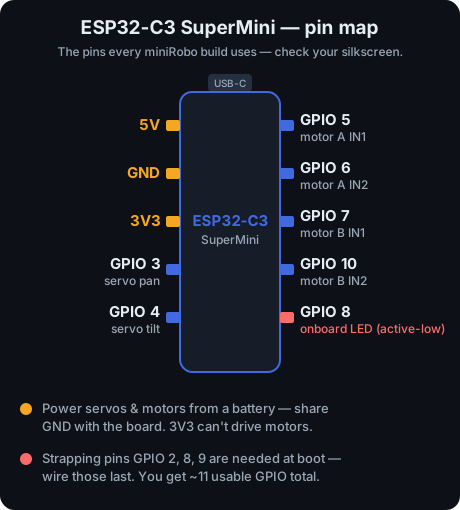
The standard minirobo pin map — same GPIO 5/6/7/10 wiring as the DRV8833 episode.
Count them: four motor wires, four control wires, two battery wires, one shared ground. Eleven wires — that's the entire robot. Build on a breadboard first; solder once it works.
The code — first drive
Two little functions do everything: motor() handles direction + speed for one pair of pins, and drive() calls it once per wheel — so steering is just two numbers. Full sketch in the sidebar.
// minirobo EP6 — first drive (ESP32 + DRV8833 + 2× N20)
const int AIN1=5, AIN2=6;    // left motor
const int BIN1=7, BIN2=10;   // right motor
const float RIGHT_TRIM = 0.92;  // tune until it tracks straight

void motor(int in1,int in2,int spd){
  spd = constrain(spd,-255,255);
  if (spd>=0){ analogWrite(in1,spd);  analogWrite(in2,0); }
  else       { analogWrite(in1,0);    analogWrite(in2,-spd); }
}
void drive(int left,int right){
  motor(AIN1,AIN2,left);
  motor(BIN1,BIN2,right*RIGHT_TRIM);
}
void setup(){ for(int p:{AIN1,AIN2,BIN1,BIN2}) pinMode(p,OUTPUT); }
void loop(){ drive(200,200); }   // forward — make it yours
drive(200, 200) is forward. drive(200, -200) spins in place. Open the loop and change it — make it drive a square, make it dance. Every robot behavior is just drive() calls with different numbers.
Where builds go wrong
- Spins in a circle? One motor is wired backwards — swap that motor's two wires at the driver.
- Drives in a curve? No two motors match. Lower
RIGHT_TRIMon the side pulling ahead, upload, test, repeat. - Resets when the wheels start? Brownout — make sure the motors run off the battery through the driver, not the ESP32's USB power.
- Totally dead? Check the shared ground wire first, then the classic charge-only USB cable.
- Hums and stalls? A wheel is rubbing the chassis. Spin both by hand before you blame the wiring — a stalled N20 cooks itself.
⏱ Your 60-second challenge
Two meters of masking tape, dead straight.
Tune your RIGHT_TRIM until the rover tracks the tape the whole way, then post your final trim number in the YouTube comments — let's see how different everyone's "identical" motors really are. Mine was 0.92.